
You are using an out of date browser. It may not display this or other websites correctly.
You should upgrade or use an alternative browser.
You should upgrade or use an alternative browser.
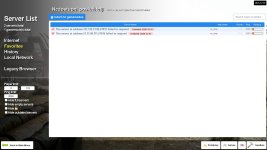
Answered how to fix? these are the ttt giants layer server
- Thread starter cooldude42
- Start date
Solution

This typically happens when your gmod client updates and the server's does not. I'm not sure about the status of these two servers, but if it is an issue of the server not being updated to the latest version of gmod, all you'll be able to do is wait for the server owner to update it.
If that isn't the case it may be something to do with your game files, and I would recommend verifying the integrity of your game files in steam, as well as potentially clearing your addons folder and unsubscribing to addons. It is most likely the first issue, but if it isn't then these two steps will resolve a lot of potential issues on your end.
Edit: I didn't originally realize that these were actually the Giant's Lair IPs. It lists as having been...
If that isn't the case it may be something to do with your game files, and I would recommend verifying the integrity of your game files in steam, as well as potentially clearing your addons folder and unsubscribing to addons. It is most likely the first issue, but if it isn't then these two steps will resolve a lot of potential issues on your end.
Edit: I didn't originally realize that these were actually the Giant's Lair IPs. It lists as having been...

This typically happens when your gmod client updates and the server's does not. I'm not sure about the status of these two servers, but if it is an issue of the server not being updated to the latest version of gmod, all you'll be able to do is wait for the server owner to update it.
If that isn't the case it may be something to do with your game files, and I would recommend verifying the integrity of your game files in steam, as well as potentially clearing your addons folder and unsubscribing to addons. It is most likely the first issue, but if it isn't then these two steps will resolve a lot of potential issues on your end.
Edit: I didn't originally realize that these were actually the Giant's Lair IPs. It lists as having been outdated since December 10th, but you've played on the server since then. I don't have this issue when trying to join, so I'm led to believe that this is something on your end. I would try the following increasingly tedious tasks one at a time until something works:
If that isn't the case it may be something to do with your game files, and I would recommend verifying the integrity of your game files in steam, as well as potentially clearing your addons folder and unsubscribing to addons. It is most likely the first issue, but if it isn't then these two steps will resolve a lot of potential issues on your end.
Edit: I didn't originally realize that these were actually the Giant's Lair IPs. It lists as having been outdated since December 10th, but you've played on the server since then. I don't have this issue when trying to join, so I'm led to believe that this is something on your end. I would try the following increasingly tedious tasks one at a time until something works:
- See if you can join off server browser outside of the favorites tab or off the join links on the main page of the forums.
- Check if you have a steam update, then fully close and restart steam.
- Check if you have a Gmod update
- Verify the integrity of your game files through steam
- Unsubscribe from all addons in your gmod workshop, then go to your gmod addons folder and delete the contents of it.
- Restart your computer
- Uninstall and reinstall gmod
Last edited: